
Unlocking the Potential: SamFw FRP Tool Complete Guide
A reliable solution for bypassing FRP locks on Android devices
Introduction
Factory Reset Protection (FRP) is a Google security feature designed to prevent unauthorized access after a reset. However, users may sometimes get locked out of their own devices. The SamFw FRP Tool provides a simple and effective solution.
What is FRP?
FRP (Factory Reset Protection) ensures that a device cannot be used after a factory reset without verifying the original Google account. While useful for security, it can cause problems when users forget credentials or buy second-hand phones.
About SamFw FRP Tool
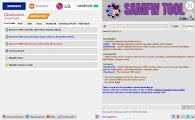
The SamFw FRP Tool is a lightweight utility designed to bypass FRP locks on Samsung and Android devices with ease.
- One-click FRP bypass for Samsung devices
- Supports multiple Android versions
- Simple and beginner-friendly interface
- Fast and reliable operation
How to Use SamFw FRP Tool
- Download the SamFw FRP Tool from the official website
- Install USB drivers on your PC
- Connect your Android device via USB cable
- Launch the tool and select FRP bypass option
- Follow on-screen instructions to complete the process
The process is simple and does not require advanced technical knowledge.
Common Issues & Fixes
- Device not detected: Install or update USB drivers
- Tool not working: Restart PC and try again
- Compatibility issues: Use supported Android versions
Is SamFw FRP Tool Safe?
Yes, the tool is safe when downloaded from trusted sources. Always ensure you use official websites to avoid modified or unsafe versions.
Conclusion
The SamFw FRP Tool is one of the easiest solutions for bypassing FRP locks on Samsung devices. It is fast, simple, and effective for both beginners and technicians.
Stay updated for more mobile repair tools and guides.





0 Comments